
The 3D Heart Equation: Plot a Spinning Heart on Google

Software Architecture, DevOps & System Design
In this article
- Discover the hidden graphing functionality built directly into Google Search.
- Learn the exact 3D heart equation you need to paste into the search box.
- Find out how Google's WebGL capabilities render complex mathematical formulas in real-time.
- See how engineers and math lovers push the limits of search engine tools for fun.
- Understand what browser requirements are necessary to view the 3D spinning heart successfully.
The Bottom Line: You can generate an animated, spinning 3D heart directly in Google Search by pasting the following equation: 5 + (-sqrt(1-x^2-(y-abs(x))^2))*cos(30*((1-x^2-(y-abs(x))^2))), x is from -1 to 1, y is from -1 to 1.5, z is from 1 to 6. It's a fantastic showcase of Google's built-in WebGL graphing functionality.
The Google Graphing Engine
When Google first introduced graphing functionality into its search engine, it was meant as a tool for students and math lovers to quickly visualize compound calculus functions. However, as an engineer, my first instinct wasn't to solve homework—it was to see how far I could push the engine's limits.
The graphing tool can plot highly complex equations, though it is limited to 32 words. With the addition of 3D model plotting capabilities, the equation game became endless. Of course, one of the most popular and romantic outputs people discovered was the 3D heart equation.
The 3D Heart Equation
You might have experimented with the 2D heart equation before. But the big G can actually render a massive, spinning Heart in 3D.
To see it in action, simply go to Google Search and paste this exact query:
5 + (-sqrt(1-x^2-(y-abs(x))^2))*cos(30*((1-x^2-(y-abs(x))^2))), x is from -1 to 1, y is from -1 to 1.5, z is from 1 to 6
Alternatively, you can just click this query link to see it instantly.
Note on AI Overviews: If Google's AI Overview intercepts the search results, the interactive graph might be pushed down. Simply scroll past the AI-generated text to find the 3D graph rendering below it.
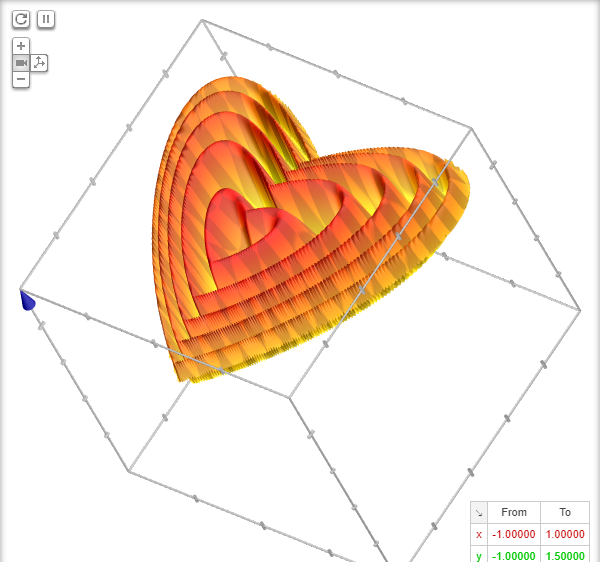
It makes for a surprisingly beautiful present for your loved one if you want to prove your geekness to them in a unique way!
Troubleshooting the Animation
If you paste the equation and do not see the spinning heart on the results page, the most likely culprit is your browser. The 3D rendering relies on WebGL.
Make sure you are using the latest version of your favorite modern browser and that hardware acceleration is enabled in your settings.

Sandeep Kumar
Founder & Software Architect | Author of “The Operational State Control Plane”
Electronics engineer, software architect, and author of The Operational State Control Plane. Specializing in system design, distributed resilience, and building scalable tech solutions with real-world engineering insights.