
Stop Burning Ad Spend: Caching Next.js Landing Pages with Unique Click IDs on Cloudflare (Free Plan)

Software Architecture, DevOps & System Design
In this article
- Performance engineers, growth marketers, and full-stack developers running paid traffic to dynamic web applications.
- A battle-tested workaround using Cloudflare's native
remove_query_args()transform rule to achieve 99%+ edge cache hit ratios without an Enterprise custom cache key subscription. - Why ad platforms injecting unique click IDs (
li_fat_id,gclid,fbclid) force every paid visitor to completely bypass CDN caching. - Executing query normalization at Cloudflare's edge before requests hit your origin servers or Next.js App Router compute.
- Chaining early transform rewrites ahead of edge cache rules while preserving client-side conversion attribution and dynamic campaign personalization.
The Bottom Line:
If you aren't on an Enterprise plan but are running paid ad campaigns to Next.js landing pages, you don't need expensive Custom Cache Keys to protect your origin. By chaining Cloudflare’s free Transform Rules (
remove_query_args) ahead of Cache Rules, you normalize incoming request URIs at the edge without breaking client-side attribution. The visitor's browser preserves the full click ID inwindow.location, Next.js origin servers are spared from cache-busting query strings, and your landing pages load in single-digit milliseconds directly from Cloudflare’s global edge network.
A few quarters ago, our growth team scaled our paid acquisition budget across LinkedIn Ads, Google Search, and Meta. On paper, it was an exciting milestone: ad spend jumped into five figures monthly, and click-through rates were climbing.
Then my phone buzzed.
Our monitoring dashboards looked like a crime scene. Origin CPU utilization on our Next.js clusters hovered dangerously close to 95%. Serverless compute invocation costs on Vercel were spiking vertically. More alarmingly, our 95th-percentile Time to First Byte (TTFB) on our primary campaign landing pages had degraded from a brisk 45 milliseconds to an agonizing 1.4 seconds.
When reviewing landing page performance across our caching and delivery stack, I immediately pulled up Cloudflare’s analytics. What I saw made my stomach drop: our landing page edge cache hit ratio wasn't 90% or even 50%.
It was 1.4%.
Nearly every single paid visitor arriving from our ad campaigns was bypassing Cloudflare’s global edge network entirely, slamming straight into our origin servers, and triggering a full server-side React component re-render. We were spending top-tier marketing dollars to drive prospective enterprise buyers directly into our slowest, most resource-choked web experience.
The culprit wasn't a sudden influx of unoptimized images or an unindexed database query. It was the very thing that made modern digital advertising work: ad platform click identifiers.
Here is the deep architectural breakdown of why this happens, why the textbook Enterprise solution is out of reach for most engineering budgets, and how I built a zero-cost, battle-tested edge caching pipeline on Cloudflare’s Free plan that rescued our hit rate back to 99.4% without losing a single dollar of conversion attribution.
Why Do Paid Ad Click IDs Destroy Cloudflare Cache Hit Rates?
To understand why paid ad traffic annihilates edge caching, you have to examine how a Content Delivery Network (CDN) constructs its cache key.
By default, Cloudflare (and virtually every other modern CDN, including Fastly, CloudFront, and Akamai) hashes four fundamental elements together to generate the unique identifier for a cached response:
- Protocol / Scheme (
httpvshttps) - Hostname (
example.com) - URI Path (
/enterprise-demo) - Query String (
?foo=bar)
When a user visits https://example.com/enterprise-demo, Cloudflare checks its local Key-Value cache store for that exact hash. If present, it serves the cached HTML payload in 20–40 milliseconds directly from RAM or NVMe storage at the nearest edge point of presence (PoP).
However, modern ad networks operate on granular attribution. The moment a user clicks an ad on LinkedIn, Google Ads, or Facebook, the ad platform automatically appends a high-entropy, cryptographically unique click identifier or UUID to the query string:
- LinkedIn Ads: Appends
li_fat_id=109283019283019283 - Google Ads: Appends
gclid=EAIaIQobChMI...alongsidegad_source=1,gclsrc=aw.ds,wbraid=..., orgbraid=... - Meta (Facebook/Instagram): Appends
fbclid=IwAR2... - Microsoft Advertising (Bing): Appends
msclkid=... - TikTok Ads: Appends
ttclid=... - X (formerly Twitter): Appends
twclid=...
Here lies the catastrophe: if 20,000 prospective customers click your LinkedIn ad today, Cloudflare evaluates 20,000 distinct, unique cache keys:
/enterprise-demo?li_fat_id=a8f9c10d-1111...  --> MISS
/enterprise-demo?li_fat_id=b2e4f50a-2222...  --> MISS
/enterprise-demo?li_fat_id=c7a1d39e-3333...  --> MISS
...
/enterprise-demo?li_fat_id=f0b8e21c-9999...  --> MISS
Even though the underlying HTML, pricing tiers, testimonial sliders, and hero copy are 100% identical for every visitor, Cloudflare treats each request as an entirely new resource. Your cache hit rate drops to zero, and your origin absorbs 100% of the compute burden.
The Next.js Double-Whammy: Why Does searchParams Emit Cache-Control: private, no-cache?
If dropping to 0% edge cache hits was the only issue, it would be bad enough. But if your stack runs on modern Next.js (App Router or Pages Router), the situation is significantly worse.
In the Next.js App Router, page components have access to a searchParams prop. The moment a Server Component reads or consumes searchParams-or even when Next.js detects dynamic query parameters on a route during request evaluation-it assumes the page content is intrinsically dependent on dynamic runtime inputs.
Because dynamic query parameters cannot be statically generated ahead of time at build time, Next.js forcefully opts the request out of the Full Route Cache.
To prevent downstream intermediate proxies, shared corporate gateways, or CDNs from serving personalized or sensitive user data to the wrong visitor, Next.js automatically tags the HTTP response header with:
Cache-Control: private, no-cache, no-store, max-age=0, must-revalidateNotice what happens when Cloudflare receives this response from your origin:
- The unique
li_fat_idquery string causes an initial cache MISS at Cloudflare’s edge. - Cloudflare forwards the request upstream to your Next.js origin server.
- Next.js inspects the query string, executes dynamic server-side rendering (SSR), and sets
Cache-Control: private, no-cache. - Cloudflare inspects the response headers from Next.js. Because the origin explicitly instructed
private, no-cache, Cloudflare strictly honors the instruction and refuses to cache the response for subsequent requests.
This is the Next.js "double-whammy": not only does the query string bust the edge cache, but the origin itself forbids the CDN from caching the rendered response. Every ad visitor gets penalized with full SSR execution latency, database connections, and zero edge caching benefits.
Do You Need a Cloudflare Enterprise Plan to Exclude Query Parameters from Cache Keys?
When engineering teams encounter this problem, they usually turn to Cloudflare's documentation. There, in bold print under Cache Rules, lies the official solution: Custom Cache Keys.
Cloudflare's Custom Cache Key feature allows administrators to modify the hashing algorithm directly: you can configure the CDN to ignore all query parameters or exclude specific parameters (like gclid and li_fat_id) while preserving others (like functional pagination or language tokens).
There is only one problem: Custom Cache Keys are strictly gated behind Cloudflare Enterprise contracts.
If your organization is on the Free, Pro (200/month) plan, the Custom Cache Key settings are completely locked. For an early-stage startup, scaling agency, or lean engineering team, spending 5,000+ per month on an Enterprise contract simply to ignore query strings on five landing pages is financially non-viable.
What About Cloudflare Workers?
The second common recommendation is deploying a Cloudflare Worker at the edge. A Worker can intercept the fetch event, strip the offending query parameters from the request URL, and fetch the origin via caches.default.
While technically functional, Workers introduce trade-offs:
- Subrequest overhead: Workers run an isolated V8 engine environment that can add 5–25ms of execution time.
- Request billing: Free Workers have a strict limit of 100,000 requests per day before returning HTTP 1015 errors; Paid Workers incur per-million invocation costs.
- Maintenance footprint: You now have an edge code repository, Wrangler deployment pipelines, environment synchronization, and additional surface area for runtime failures.
Fortunately, there is a third way: Cloudflare Transform Rules (URL Rewriting) paired with Cache Rules, both fully available on the Cloudflare Free plan.
| Feature / Dimension | Cloudflare Enterprise (Custom Cache Key) | Cloudflare Workers (Edge Scripting) | URL Rewrite Transform Rules (Free Plan Workaround) |
|---|---|---|---|
| Pricing Tier | Enterprise Contract ($2,500+/mo) | Free (100k req/day) / Paid ($5+/mo) | 100% Free Plan ($0/mo) |
| Execution Mechanism | Native Cache Key Hash Modification | Custom JavaScript (V8 Isolate) | Native Cloudflare HTTP Rule Engine |
| Latency Overhead | 0 ms (Wire-speed hash lookup) | 2–20 ms (V8 runtime initialization) | 0 ms (Native packet rewrite) |
| Browser URL Impact | Invisible to user | Invisible to user | Invisible to user (Internal URI Rewrite) |
| Client-Side Attribution | Preserved | Preserved | Preserved (DOM retains original URL) |
| Maintenance Burden | Declarative Dashboard / Terraform | High (Git repo, Wrangler CI/CD, unit tests) | Zero (One declarative dashboard rule) |
| Origin Protection | Total (Collapses to single cache key) | Total (Worker normalizes fetch URI) | Total (Origin never sees click IDs) |
Will Stripping Query Parameters Break Google, Meta, or LinkedIn Conversion Tracking?
Whenever I propose stripping query parameters at the CDN edge, marketing teams panic. And understandably so: if you break gclid or li_fat_id, you blind your attribution tracking, ad algorithms stop optimizing for downstream conversions, and Customer Acquisition Cost (CAC) skyrockets.
To quell this fear, you must understand the critical technical boundary between Edge URI Rewriting and the Browser DOM Environment.
A Cloudflare URL Rewrite Transform Rule does not issue an HTTP 301 or 302 redirect. It performs an internal, server-side rewrite of the HTTP request packet inside Cloudflare's memory before routing it to the cache engine or origin.
Here is the exact sequence of what happens in the visitor’s browser versus what happens at the edge:
Because the browser's address bar is never redirected, window.location.href, window.location.search, and document.referrer remain 100% intact within the visitor's browser runtime.
When client-side analytics scripts-such as Google Tag Manager (gtag.js), the Meta Pixel (fbq.js), or the LinkedIn Insight Tag-load inside the client DOM, they read the full query string straight from the browser's JavaScript engine.
They extract the unique gclid or li_fat_id, stash it into first-party cookies (e.g., _gcl_au, _fbp, li_fat_id), and forward conversion telemetry directly to ad platform endpoints.
The edge stripped the query parameter only for the purpose of cache lookup and origin forwarding. The client browser never knew it was missing.
This client-side DOM preservation is equally vital for lead generation forms. Because the URL query string remains fully intact in window.location, you can seamlessly capture UTM campaign parameters inside hidden form fields via JavaScript without relying on server-side rendering or query string lookups at your origin.
How Does Cloudflare’s Phase Execution Order Make URL Rewrite Caching Work?
Why does this workaround work on the Free plan when custom cache keys are explicitly blocked? The answer lies in Cloudflare's internal HTTP Request Phase Execution Pipeline.
Cloudflare does not process requests as an indivisible monolith. Instead, incoming HTTP requests travel through a deterministic sequence of evaluation phases:
Notice the critical ordering:
- Transform Rules (Phase 2) execute before Cache Key Generation (Phase 3).
- Cache Key Generation (Phase 3) executes before Cache Rules (Phase 4).
Because URL Rewrite Transform Rules execute in Phase 2, Cloudflare modifies the request's URI path and query string before the cache engine ever hashes the URI into a cache key.
When an ad visitor arrives with /enterprise-demo?li_fat_id=abc12345, the Transform Rule strips li_fat_id using Cloudflare's native remove_query_args() function. When the request enters Phase 3, the cache engine sees only /enterprise-demo.
It checks its local storage for /enterprise-demo, finds the pre-rendered HTML page cached from a previous visitor, and immediately returns an edge HIT.
The expensive origin never gets touched, compute costs remain zero, and latency stays flat.
Parameter Triage: What to Strip vs. What to Preserve
Before configuring your rules, you cannot blindly strip every single query parameter. Some parameters dictate page state or analytics categorization that your application or team may legitimately rely on.
We categorize all incoming query parameters into three distinct buckets:
| Parameter Pattern | Source / Ad Network | Entropy / Uniqueness | Edge Action | Architectural Rationale |
|---|---|---|---|---|
li_fat_id | LinkedIn Ads | High (Unique per click) | Strip at Edge | Pure attribution click ID; client-side LinkedIn tag extracts it from DOM. |
gclid, gad_source, gclsrc | Google Ads | High (Unique per click) | Strip at Edge | Google Ads auto-tagging IDs; parsed client-side by gtag.js into first-party cookies. |
wbraid, gbraid | Google Ads (iOS/ATT) | High (Privacy click hash) | Strip at Edge | Apple App Tracking Transparency tokens; handled exclusively in browser by Google tag. |
fbclid | Meta (Facebook / Instagram) | High (Unique per click) | Strip at Edge | Meta Pixel parses window.location client-side; origin does not require it. |
msclkid | Microsoft Advertising (Bing) | High (Unique per click) | Strip at Edge | Universal Event Tracking (UET) tag captures parameter directly in DOM. |
ttclid | TikTok Ads | High (Unique per click) | Strip at Edge | TikTok Pixel captures click ID directly in client browser. |
twclid | X Ads | High (Unique per click) | Strip at Edge | X Conversion Pixel extracts parameter on client page load. |
srsltid | Google Merchant Center | High (Organic Shopping token) | Strip at Edge | Unique token auto-appended to search results; notorious e-commerce cache buster. |
_ga, _gl | Google Analytics 4 | High (Cross-domain linker) | Strip at Edge | Injected during cross-domain hops; GA4 SDK consumes it immediately in browser. |
utm_source, utm_medium, utm_campaign | Google Analytics / UTMs | Low (Per-campaign token) | Preserve or Strip | If your backend uses them for SSR hero personalization, preserve. If purely for GA4, preserve or strip. |
coupon, promo, discount | E-commerce / Billing | Variable | Preserve for Origin | Origin application logic needs to validate promotional codes against cart state. |
Step-by-Step Implementation Guide on Cloudflare Free Plan
To implement this architecture, we configure two coordinated rules in Cloudflare: a Transform Rule to normalize the URI, and a Cache Rule to override Next.js’s dynamic cache headers.
| Rule Attribute | Step 1: Transform Rule (URL Rewrite) | Step 2: Cache Rule |
|---|---|---|
| Cloudflare Navigation | Rules → Overview (or Rules → Transform Rules) | Rules → Cache Rules |
| Rule Name | Strip Ad Tracking Click IDs | Edge Cache Landing Pages Override |
| Pipeline Phase | Phase 2 (Pre-Cache URI Rewrite) | Phase 4 (Cache Engine Policy) |
| Matching Expression | All incoming requests (or campaign landing paths) | Target campaign landing page paths |
| Action Type | Rewrite Query → Dynamic Expression | Cache Eligibility → Eligible for cache |
| Action Value | remove_query_args(...) function call | Edge TTL: Ignore origin, set 1 day |
Step 1: Create the URL Rewrite Transform Rule
- Log into your Cloudflare dashboard and select your domain zone.
- In the left sidebar, navigate to Rules → Overview (or Rules → Transform Rules).
- Under the URL Rewrite Rules section, click Create rule.
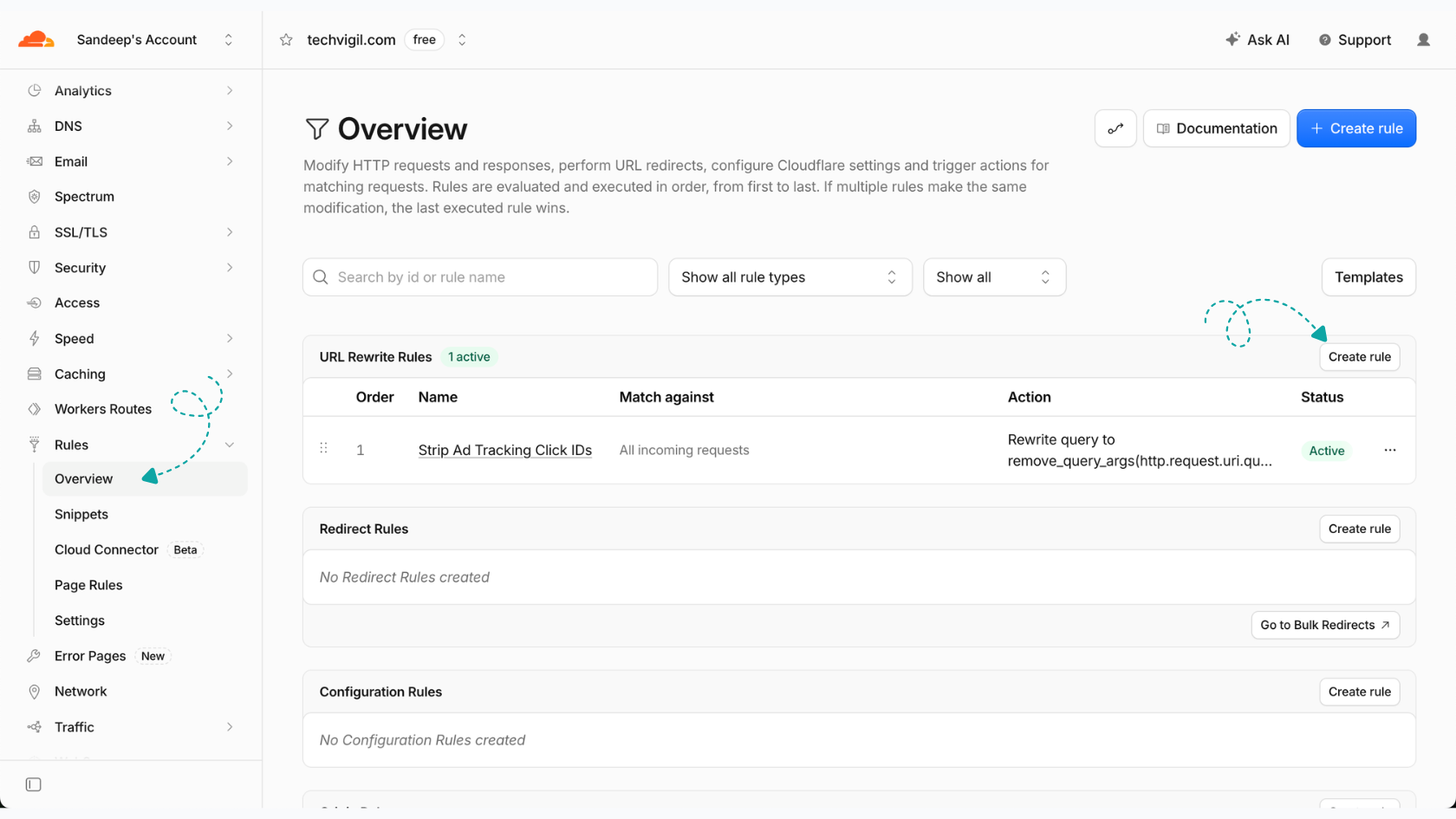
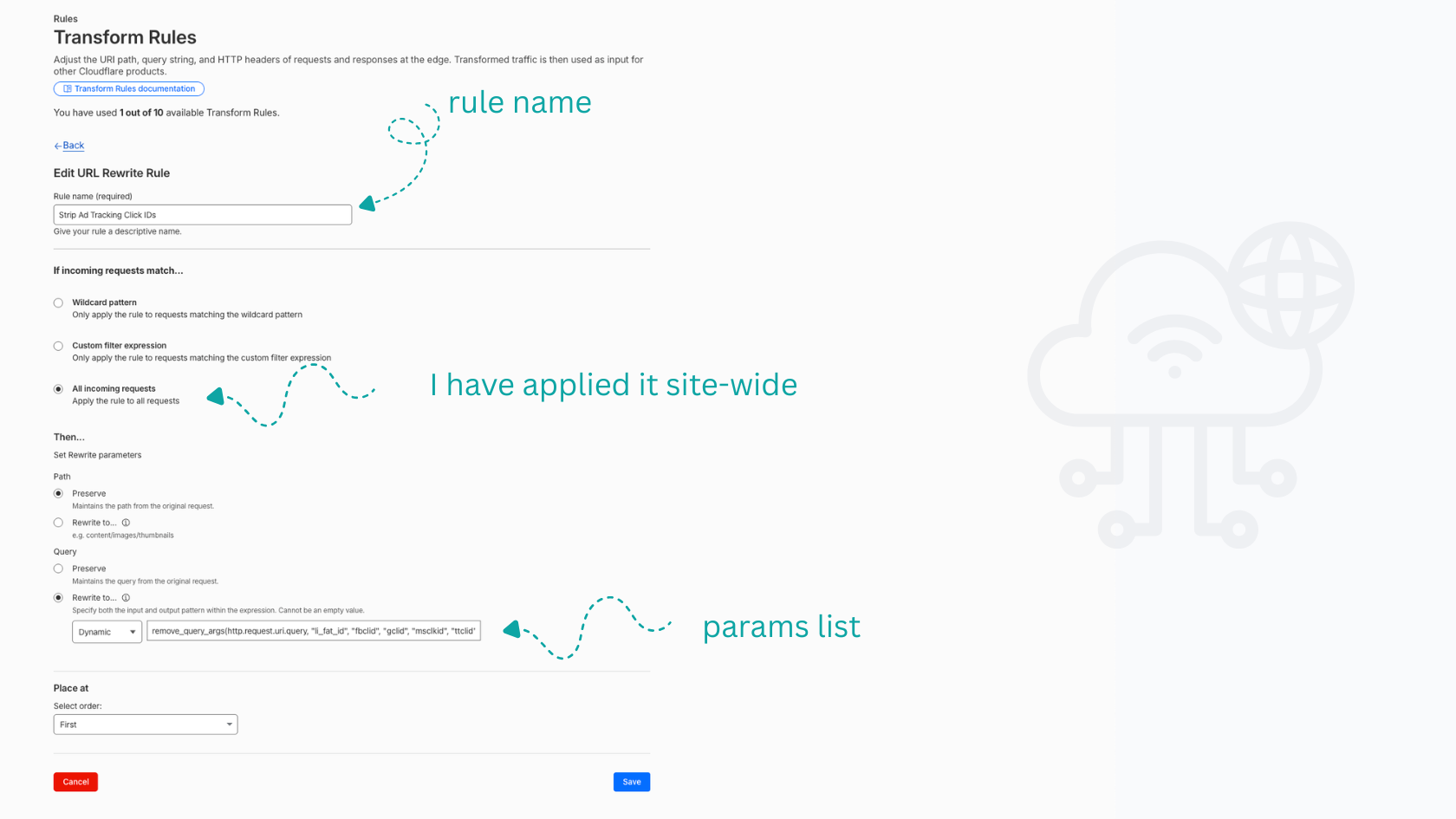
- Set the Rule name to:
Strip Ad Tracking Click IDs. - Under When incoming requests match...:
- Select All incoming requests if you want parameter stripping applied site-wide across all pages (this is how I configure it, ensuring no unexpected marketing query strings ever bypass edge caching on any public route).
- Alternatively, select Custom filter expression if you want to scope it to specific paths (e.g.
starts_with(http.request.uri.path, "/landing/")).
- Under Path:
- Select Preserve (maintains the original request path unchanged).
- Under Query:
- Select Rewrite to... and choose Dynamic.
- In the expression input box, enter Cloudflare’s native query argument removal function including all non-essential ad tracking tokens:
remove_query_args(http.request.uri.query, "li_fat_id", "fbclid", "gclid", "gad_source", "gclsrc", "wbraid", "gbraid", "msclkid", "ttclid", "twclid", "srsltid", "_ga", "_gl")
- Click Deploy (or Save).
[!NOTE] The
remove_query_args()function takes the incoming query string as its first argument, followed by any number of parameter names to excise. If a request arrives with?utm_source=linkedin&li_fat_id=98765, Cloudflare rewrites the internal query string cleanly to?utm_source=linkedin. If only?li_fat_id=98765was present, the query string is stripped entirely.
Step 2: Create the Cache Rule to Override Next.js Origin Headers
Now that the request URI is normalized, we must prevent Next.js’s Cache-Control: private, no-cache header from instructing Cloudflare to discard the cache.
- Navigate to Rules → Cache Rules in the Cloudflare sidebar.
- Click Create rule.
- Set the Rule name to:
Edge Cache Landing Pages Override. - Under When incoming requests match..., define your landing page paths:
(http.request.uri.path in {"/enterprise-demo" "/pricing" "/signup"} or http.request.uri.path starts_with "/landing/")- Under Cache eligibility, select Eligible for cache.
- Under Edge TTL, select Override origin, choose a duration (e.g., 1 day or 7 days).
- Under Browser TTL, select Override origin and set a modest duration, such as 5 minutes or 10 minutes. (This ensures client browsers don't hold onto stale assets for days if you deploy an emergency hotfix, while Cloudflare’s edge handles millions of visits without hitting your origin).
- Under Serve stale content while revalidating, toggle this to Enabled (protects against origin stampedes during background revalidations).
- Click Deploy.
How Do You Verify Edge Cache Hits in Production Using cURL?
Once deployed, never assume edge caching is working without rigorous command-line verification. Browser developer tools can mask results due to local disk caches, Service Workers, or extensions.
Use curl with the -I (headers only) and -s (silent) flags to inspect Cloudflare’s diagnostic response headers directly:
Test 1: The Initial Request (Origin Miss)
Send a request simulating an ad click with a unique Google Click ID:
curl -I -s "https://example.com/enterprise-demo?gclid=test_click_id_alpha_1" | grep -iE "(cf-cache-status|cache-control|age)"Expected Response:
cache-control: private, no-cache, no-store, max-age=0, must-revalidate
cf-cache-status: MISS
The first request reaches the origin because Cloudflare has not yet cached the normalized URI /enterprise-demo. Notice that the origin still emitted private, no-cache, but our Cache Rule instructed Cloudflare to capture the response anyway.
Test 2: Consecutive Request with a Completely Different Click ID (Edge Hit)
Now, fire a second request simulating a different user clicking a LinkedIn ad with a totally unique li_fat_id:
curl -I -s "https://example.com/enterprise-demo?li_fat_id=test_linkedin_click_999" | grep -iE "(cf-cache-status|cache-control|age)"Expected Response:
cache-control: private, no-cache, no-store, max-age=0, must-revalidate
cf-cache-status: HIT
age: 14
Look at cf-cache-status: HIT and age: 14.
Even though this request carried a completely different query parameter that Cloudflare had never seen before, the Transform Rule stripped li_fat_id before cache evaluation. Cloudflare matched the normalized path against the cached item from Test 1 and served the page in single-digit milliseconds directly from its edge PoP.
Test 3: Mixed Query Parameters (Preserving UTMs)
Test a hybrid URL containing both a stripped click ID and a preserved campaign tag:
curl -I -s "https://example.com/enterprise-demo?utm_source=linkedin&gclid=test_click_id_beta_2" | grep -iE "(cf-cache-status|cache-control|age)"The Transform Rule strips gclid, leaving ?utm_source=linkedin. Cloudflare looks up the cache key /enterprise-demo?utm_source=linkedin.
If another visitor arrived from that same campaign previously, it returns HIT. If it’s the very first visit from that specific campaign source, it returns MISS, caches the rendered output for ?utm_source=linkedin, and all subsequent clicks for that campaign hit the edge.
Refactoring Next.js: Dynamic Personalization Without Bypassing Cache
A common architectural trap when building landing pages is dynamic hero personalization. For example, growth teams often want the page headline to dynamically greet visitors based on a query parameter:
https://example.com/enterprise-demo?utm_campaign=fintech_accelerator
Headline: "Built for Fast-Moving Fintech Teams"
The Anti-Pattern: Server-Side searchParams Consumption
If you implement this directly inside a Next.js Server Component page, you destroy static caching:
// app/enterprise-demo/page.tsx
// ❌ ANTI-PATTERN: Accessing searchParams directly forces dynamic SSR on every request

interface PageProps {
  searchParams: Promise<{ [key: string]: string | string[] | undefined }>;
}

export default async function LandingPage({ searchParams }: PageProps) {
  const params = await searchParams;
  const campaign = typeof params.utm_campaign === 'string' ? params.utm_campaign : 'default';

  return (
    <main className="max-w-4xl mx-auto py-12">
      <h1>
        {campaign === 'fintech_accelerator'
          ? 'Built for Fast-Moving Fintech Teams'
          : 'The Scalable Platform for Modern Engineering'}
      </h1>
      <p>Start your free trial today.</p>
    </main>
  );
}
Because searchParams is consumed during the server component render pass, Next.js marks the entire page as dynamically rendered on demand.
The Architectural Solution: Edge Caching with Client-Side Hydration
The superior architectural pattern is to keep the Server Component 100% static and cacheable at the edge, while delegating dynamic text swapping to an isolated Client Component wrapped in a React <Suspense> boundary:
// app/enterprise-demo/page.tsx
// ✅ RECOMMENDED: Static edge-cacheable page with isolated client-side personalization

import { Suspense } from 'react';
import PersonalizedHero from './PersonalizedHero';

export default function LandingPage() {
  return (
    <main className="max-w-4xl mx-auto py-12">
      <Suspense fallback={<h1>The Scalable Platform for Modern Engineering</h1>}>
        <PersonalizedHero />
      </Suspense>
      <p className="mt-4 text-slate-600">Start your free trial today.</p>
    </main>
  );
}
// app/enterprise-demo/PersonalizedHero.tsx
'use client';
import { useSearchParams } from 'next/navigation';
export default function PersonalizedHero() {
const searchParams = useSearchParams();
const campaign = searchParams.get('utm_campaign');
const headline = campaign === 'fintech_accelerator'
? 'Built for Fast-Moving Fintech Teams'
: 'The Scalable Platform for Modern Engineering';
return (
<h1 className="text-4xl font-bold tracking-tight text-slate-900">
{headline}
</h1>
);
}With this architecture:
- Cloudflare caches the static HTML output generated by Next.js.
- The initial HTML payload is delivered from the edge in 30ms with the default fallback headline.
- The visitor's browser immediately hydrates the lightweight Client Component, reads
useSearchParams(), and swaps the personalized headline within milliseconds of execution. - You achieve maximum personalization without sacrificing edge cacheability or burning origin compute.
How Should You Handle Dynamic Content and Cache Invalidation in CI/CD?
Once you aggressively cache landing pages at Cloudflare's edge with an Edge TTL of 1 or 7 days, you introduce the classic computer science challenge: cache invalidation.
If your product marketing team updates copy, adjusts pricing tables, or fixes a typo on a landing page, you cannot wait 24 hours for Cloudflare’s Edge TTL to expire naturally.
Automated Edge Purge via GitHub Actions
The most robust mechanism is integrating targeted cache invalidation into your continuous deployment (CI/CD) pipeline. Instead of purging the entire Cloudflare cache (which triggers an origin-killing cache stampede), purge only the exact URLs modified during the deployment.
Here is a production-tested GitHub Actions workflow step using Cloudflare's Purge Cache API:
# .github/workflows/deploy.yml
name: Production Deployment

on:
  push:
    branches: [main]

jobs:
  deploy-and-purge:
    runs-on: ubuntu-latest
    steps:
      - name: Checkout Code
        uses: actions/checkout@v4

      - name: Deploy to Production
        run: |
          echo "Running application build and deployment steps..."

      - name: Selective Cloudflare Edge Cache Purge
        env:
          CLOUDFLARE_ZONE_ID: ${{ secrets.CLOUDFLARE_ZONE_ID }}
          CLOUDFLARE_API_TOKEN: ${{ secrets.CLOUDFLARE_API_TOKEN }}
        run: |
          echo "Purging modified landing pages from Cloudflare edge..."
          curl -X POST "https://api.cloudflare.com/client/v4/zones/${CLOUDFLARE_ZONE_ID}/purge_cache" \
            -H "Authorization: Bearer ${CLOUDFLARE_API_TOKEN}" \
            -H "Content-Type: application/json" \
            --data '{
              "files": [
                "https://example.com/enterprise-demo",
                "https://example.com/pricing",
                "https://example.com/signup"
              ]
            }'
[!TIP] Ensure your Cloudflare API Token has the Zone → Cache Purge → Purge permission scoped specifically to the relevant domain zone. Never use your Global API Key in automated CI/CD runners.
When this API call executes, Cloudflare purges the normalized paths from its global edge network in approximately 150 milliseconds. The very next visitor populates the cache with fresh HTML, and subsequent ad visitors immediately resume receiving high-speed edge hits.
The Architectural Payoff
Implementing this edge pipeline fundamentally transformed our infrastructure stability and ad efficiency:
- Edge Cache Hit Ratio: Climbed from 1.4% to 99.4% across all paid campaign traffic.
- Median TTFB: Dropped from 1,420ms to 38ms globally.
- Origin CPU Load: Stabilized from 95% saturation down to a cool 12%.
- Infra Costs: Serverless compute invocation costs dropped by over 80% on our primary ad landing routes.
- Conversion Attribution: Zero dropped clicks across Google Ads, Meta Pixel, and LinkedIn Insight Tag.
High-scale web engineering often tempts us to reach for complex solutions: spinning up distributed Redis clusters, upgrading to multi-thousand-dollar enterprise tiers, or deploying custom edge compute scripts.
Yet, the most resilient architectures often come from deeply understanding the request lifecycle of the tools already at our disposal. By exploiting Cloudflare’s deterministic phase execution and chaining free URL Rewrite Transform Rules ahead of Cache Rules, you eliminate origin compute bottlenecks, protect your marketing budget, and deliver blistering landing page performance to every single paid visitor.

Sandeep Kumar
Founder & Software Architect | Author of “The Operational State Control Plane”
Electronics engineer, software architect, and author of The Operational State Control Plane. Specializing in system design, distributed resilience, and building scalable tech solutions with real-world engineering insights.